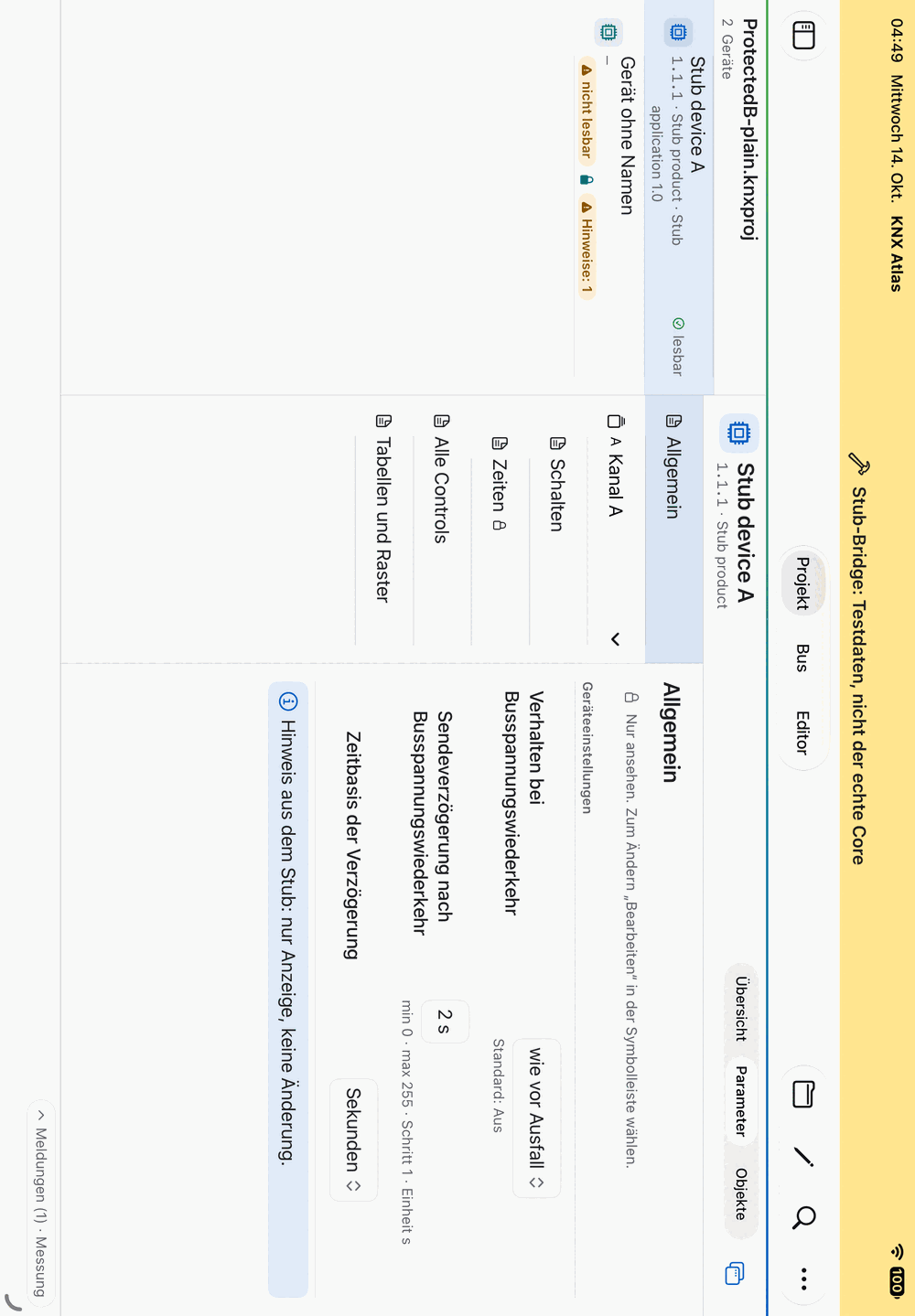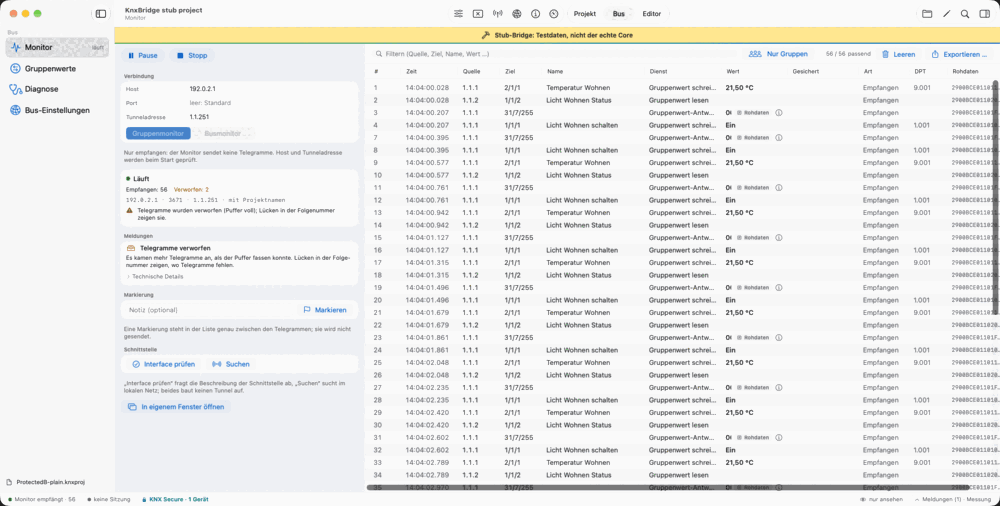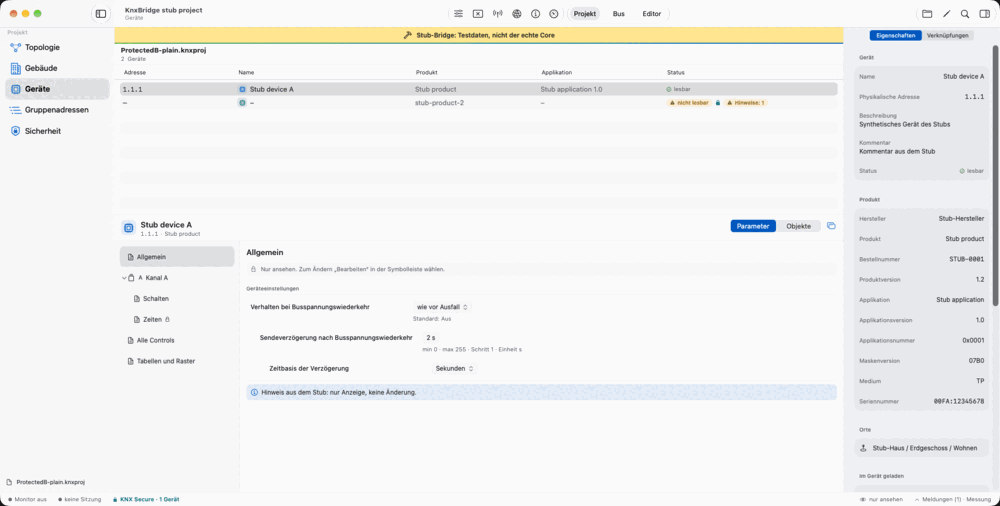
See the project in context
Topology, building structure, devices, group addresses and communication objects lead from the overview to the relevant details.

For macOS and iPadOS
Explore KNX projects, edit parameters and follow telegrams in a native app for Mac and iPad.
In development · macOS & iPadOS
KNX Atlas is in development. These pages describe the current preview; a release date, price and distribution channel have not been announced.
Topology, building structure, devices, group addresses and communication objects lead from the overview to the relevant details.
Change parameters and links in supported, password-protected projects, undo changes and inspect their impact.
Group or bus monitor with search, filters, personal markers and CSV export for further analysis.
Choose group addresses, enter values using the appropriate datapoint type and explicitly confirm every write before sending.
Inspect interfaces, tunnels and secured group addresses in the project. Missing credentials and Secure messages come with explanations.
Native windows, keyboard commands and a device inspector on Mac; an adaptive interface for portrait and landscape on iPad.
From an overview of your installation to a specific change: explore the project views, editor and bus tools. Each chapter explains one workspace, what it offers and what it requires.
Topology, buildings, devices and group addresses are different ways into the same project. KNX Atlas keeps their relationships accessible as you move between views.
Read moreAdjust parameters and links, review your changes and inspect their impact before saving. The editor works with supported, password-protected projects.
Read moreFollow telegrams, narrow down the display and mark interesting moments. You can also check whether selected devices are reachable through the interface.
Read moreChoose group addresses, read values and prepare input using the right datapoint type. Before a write, KNX Atlas shows what will be sent and where it will go.
Read moreKNX Atlas shows which Secure information a project contains and what a connection is missing. KNX IP Secure and KNX Data Secure are identified at the relevant places in the interface.
Read morePlatforms, project formats, bus access and the limitations of the preview in context. Understand how the described scope of KNX Atlas fits your work.
Read moreWorking on a project file and working on a live bus serve different purposes. KNX Atlas gives you access to both and makes it clear when you are editing a file or using a connection to the installation.
Open an existing .knxproj file, enter its project password if needed and use topology, buildings or search to find the device you need.
Look through parameters, objects and links. At the installation, use a KNXnet/IP connection to observe telegrams or check reachability.
Check supported project changes and save them as a separate file. Group values use a dedicated session and are sent only after explicit confirmation.
Actual preview screenshots using synthetic demo data. The yellow banner identifies test mode. The screenshots show the German interface; the app also supports English.
KNX Atlas helps you understand and work with an existing KNX installation: look up devices and links, edit supported project parameters and investigate bus traffic. It is designed for integrators and technically minded installation owners who want to use their Mac or iPad.
To browse a project, you need a supported .knxproj file for your installation and its password if the file is protected. The monitor, group values and device diagnostics also require a reachable KNXnet/IP interface. You do not need to connect to the installation just to browse the file.
KNX Atlas runs directly on Mac and iPad. The app features described here do not require Windows, a running ETS installation or an additional visualisation server. Project work starts with an existing, supported project file.
You can browse a locally available project file and make supported edits without an internet connection. Bus tools need a network connection to the KNXnet/IP interface, but no cloud service. If the file is stored with a cloud file provider, download it to your device first.
The bus tools use KNXnet/IP tunnelling. You need a suitable IP interface or an IP router with a supported tunnelling function. The app can discover interfaces, and you can also enter the host and port manually. USB and IP routing are not currently supported connection methods.
The app supports KNX IP Secure and KNX Data Secure in the relevant bus tools. The necessary credentials and keys must be present in the open project. The Secure overview shows which information is available and what is missing for a connection.
No. KNX Atlas processes the project locally on your device; it does not need to upload it to a project server. If you use iCloud Drive or another file provider, that provider may synchronise the file independently of KNX Atlas.
KNX Atlas is in development and is not yet publicly available. A release date, price and distribution channel have not been announced. This website presents the current development version.
Need help, want to report a problem or share feedback? Feel free to get in touch.
Please include the app version, operating-system version, device and a short description. Do not send passwords, tokens or other confidential data.