Start with a fixed address selection
Choose group addresses from the open project or enter them manually. A group address detail view also provides a route to reading and writing. Names and a Secure indicator help you recognise the intended target.
Connection settings and the address selection are checked when the session opens. Reads and writes within that session are limited to the selected addresses. The list stays fixed while the session is open; close the session and open a new one to change the selection.
Actively request a value
Read requests a value from the chosen group address. This differs from passive observation in the monitor: a read request is itself communication with the installation.
Whether and when a response arrives depends on the device, its flags and the installation. Interpret a missing value alongside session messages and, if useful, the telegram stream. A project file alone cannot supply a live response.
Input that fits the value
The datapoint type determines how a value is entered and displayed. KNX Atlas presents the input form and hints supplied by the core. Not every type is reduced to a plain number field.
Before a write, input is checked and a preview is produced. If rounding is required, a corresponding message appears. The supported datapoint type of the particular address is what matters.
- Switches and selections
- Appropriate choices for switching states or predefined options.
- Numbers and text
- Value fields with relevant limits, units, steps or examples where provided.
- Composite values
- Separate fields for the components of a composite value or colour when supported by the input form.
Prepare first, then explicitly send
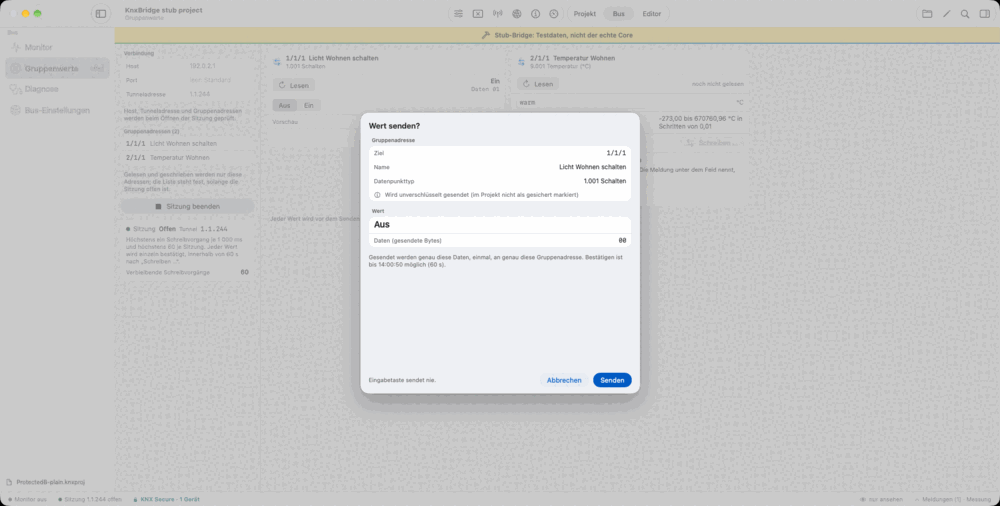
Write prepares a write operation. The confirmation dialog shows the target address, its project name where available, the value preview and the data to be sent. Preparation alone does not send a value.
Only Send executes the prepared operation. Cancelling or closing the dialog sends nothing. The Return key does not trigger Send. A prepared operation has a limited lifetime and can be used only once.
The session shows the applicable limits and remaining writes. After closing, it reports reads, prepared plans and sent writes, among other totals. These counts do not guarantee that an actuator performed the expected action.
With KNX Secure and a parallel monitor
For a secured group address, the app shows the Secure state in both the session and the confirmation dialog. The required information comes from the open project. Missing or invalid keys are reported as problems.
A group monitor can accompany the session if another usable tunnel is available. This helps you see requests and responses in context. If the interface does not offer a second tunnel, you can switch to a single connection.