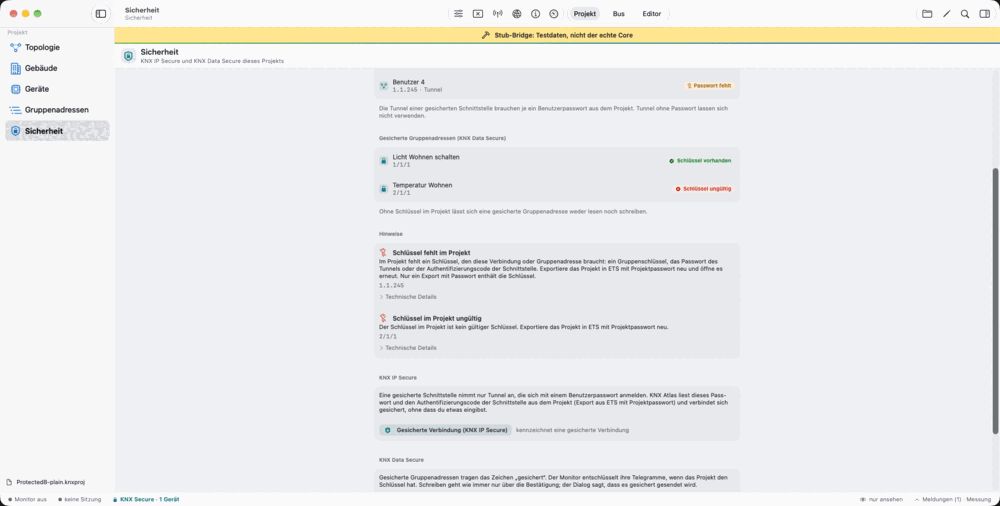
A dedicated view of Secure information
The Security area brings together the interfaces, tunnels and secured group addresses found in the project. For a tunnel, the app shows its address, user assignment and whether the required credentials are present.
For secured group addresses, you can see the state of the corresponding key information. Missing or invalid data comes with an explanation. This helps you understand a rejected connection instead of facing only a generic error.
Distinguish IP Secure from Data Secure
KNX IP Secure and KNX Data Secure apply at different levels. IP Secure protects the relevant IP connection; Data Secure applies to secured group communication data. A secured IP connection therefore does not automatically mean that every group address uses Data Secure.
KNX Atlas shows the Secure state where it matters to the current task: on the connection, tunnel slot, group address and prepared write. The appropriate Secure behaviour is selected from the project context.
- Interfaces and tunnels
- Inspect assignment and available credentials for the connection described in the project.
- Group addresses
- Recognise secured addresses and the reported state of their key information.
- Write dialog
- See the indicator that a prepared value will be sent using Secure.
Telegram states remain distinct
A secured telegram in the monitor can have different states: successfully decrypted, recognised as a replay, missing a suitable key or invalid. The app uses text and indicators to distinguish these states instead of presenting them as ordinary values.
CSV export can include Secure states as a separate column. Decrypted inner services and values are included only when project contents are explicitly enabled. Without that choice, the export stays with the designated raw and state information.
The password belongs to your project file
A password-protected project requires its correct password. KNX Atlas can remember it in the device keychain if you ask. It is not stored automatically, and the entry is tied to the specific file. A newly exported project is not simply treated as using an old password.
The keychain entries are not intended to synchronise between devices. Opening the file on another device may therefore require entering the password again. This is independent of whether the project file itself is stored in iCloud Drive, for example.
The Secure tools do not provide a separate field for arbitrary key entry. The app uses supported information from the open project and indicates when that information is insufficient for a suitable connection.
Handle files, the keychain and exports deliberately
Project processing takes place locally in the app process. Browsing the file does not require a project upload. The app uses the local keychain only if you ask it to remember a password; its bundled privacy declaration lists no tracking.
A file in iCloud Drive or another file provider is also subject to that provider’s synchronisation. A CSV export you save may contain names, values or project relationships. Choosing a storage location and export contents therefore remains part of your workflow.
A Secure indicator is not a blanket compatibility guarantee for every interface and device. Suitable product data, valid credentials and a connection supported by the current scope are required.