Start with the project you already have
KNX Atlas opens existing .knxproj files. For a password-protected project, enter the corresponding password. The project is processed directly in the app; you do not need to run ETS alongside it to browse the file.
The start screen offers a file-opening action and a list of recently opened projects. You can return to a familiar project without going through the file picker every time. A different export may need its own password, even if it describes the same installation.
Several paths through the same installation
Sometimes you know the individual address; sometimes you only know the room or device name. The different project views let you start with the information you have.
Selecting an entry leads to its details. This lets you follow a relationship instead of piecing together information from separate lists in your head.
- Topology
- Areas and lines provide a technical route to the devices in the project.
- Buildings
- The building structure stored in the project provides a spatial point of reference.
- Devices
- A direct device list for targeted selection and access to parameters and objects.
- Group addresses
- Addresses and their links provide a functional route through the installation.
From a device to its functions
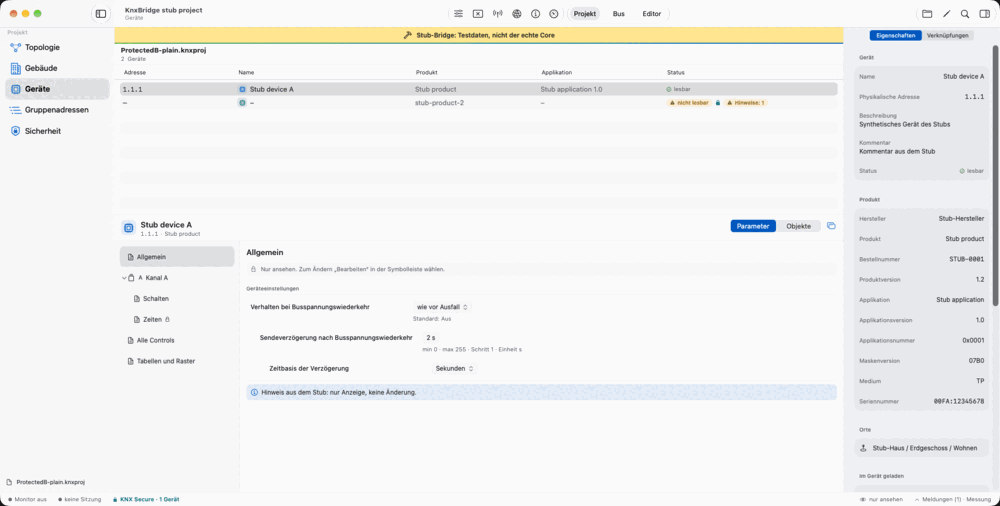
The device workspace connects the overview with parameter pages and communication objects. Parameters follow the structure of the product data. Depending on the parameter type, the interface uses appropriate controls such as selections, switches or value fields.
Filters help narrow down the communication objects. Linked group addresses show how an object fits into the project. Whether a parameter is read-only or editable depends on the supported product and the current project state.
The device inspector on Mac keeps an overview beside your workspace. A device can also open in a separate window; on iPad, its presentation depends on the windowing mode you are using.
Search, select and continue
Global search takes you to the relevant target in the project. Open the search palette with the keyboard and move from a result to its view. This is particularly useful when you do not yet know the full structure of a project.
KNX Atlas organises work into Overview, Bus and Editor areas. The sidebar shows the tools belonging to the current area. Menu commands and keyboard shortcuts complement navigation on Mac; on iPad, it adapts to the available space.
Project information is not a live reading
The project views show information stored in your file. You can use them without a connection to the KNX installation. Live telegrams, group values and reachability checks require a suitable KNXnet/IP interface.
A device listed in a file is not necessarily reachable on the bus. Likewise, a stored parameter does not prove that this exact setting has already been downloaded into the device. Project views and bus tools answer different questions.